
Elevate your living experience
Elevate your living experience

Smart homes are meant to make life easier, until your lights flicker, your plugs stop responding, or the app decides it’s had enough… It’s happened to all of us. Most of the time, it’s not the tech that’s broken. It’s a few small setup mistakes that trip everything up and mess up your system.
Avoiding these smart home mistakes saves you hours of frustration and keeps your gadgets running smoothly. Let’s go through the usual culprits and how to dodge them.
Even people who’ve been at this for a while mess up on these basics:
Here’s how to keep things simple and working:
A few minutes of prep saves hours of swearing later.
The good news is that most smart home problems are easy to avoid. Whether it’s improving your Wi-Fi coverage, making devices easier to control, or ensuring everything works together, these products can help you build a smarter home with fewer headaches.
Click the pictures or buttons to shop!
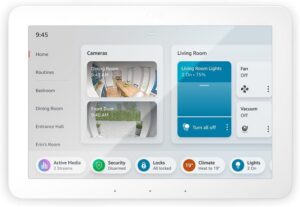
The Amazon Echo Hub is a central hub for Alexa-compatible devices.
This helps: Keep everything under one roof and reduce compatibility issues by controlling your Alexa-compatible smart home devices from one central place. Instead of switching between multiple apps, you can manage your lights, plugs, cameras, and routines through a single, easy-to-use dashboard.
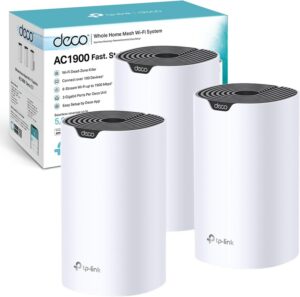
No more weak signal zones or random disconnects.
This helps: Handle multiple smart home devices without overwhelming your network. By creating strong Wi-Fi coverage throughout your home, the Deco S7 helps reduce connection dropouts, improves device reliability, and prevents one of the most common smart home frustrations: devices going offline when you need them most.
How to Set It Up in 3 Steps:
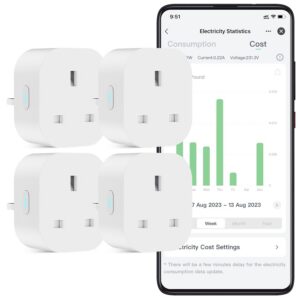
A reliable little plug that’s great for testing Wi‑Fi strength.
This helps: Test your Wi-Fi before expanding your smart home. If a simple device like the EIGHTREE smart plug connects quickly and stays online reliably, it’s a good sign your network is ready to support more smart devices.
Once everything’s running smoothly, keep it that way:
Small habits, big differences.
Do I need a hub for every device?
Not always, as many connect directly to Wi‑Fi, but hubs make automation smoother.
Why do my devices keep disconnecting?
Check your Wi‑Fi range and make sure you’re using the 2.4 GHz band.
Can I mix Alexa and Google Home?
You can, but it’s easier to stick with one system as they don’t play well together.
Amazon Echo Hub – https://amzn.to/4wbmNM9
Link Deco S7 Mesh Wi‑Fi System – https://amzn.to/4w6xtM0
EIGHTREE Smart Plug –https://amzn.to/4yvC4c6
HomeSmarti participates in the Amazon Associates programme. We may earn a small commission from qualifying purchases at no extra cost to you.